


Tornado Watch? Leveraging NissanConnect for Real-Time Weather Alerts
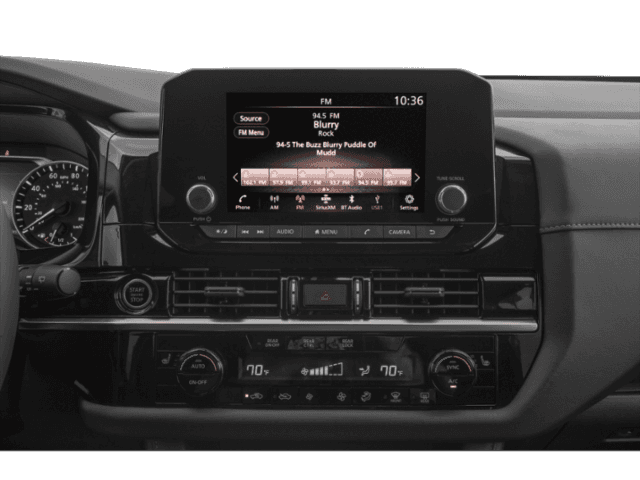
When dark clouds roll across the St. Louis metro and your phone starts buzzing with severe weather warnings, having access to real-time information through your Nissan’s connected systems can be a game-changer. NissanConnect weather alerts add another layer of awareness during severe weather, pushing timely notifications straight to your vehicle’s infotainment system and the myNISSAN app. Sure, these features don’t replace official emergency alerts or NOAA warnings, but they definitely help St. Louis drivers stay in the loop when conditions shift quickly.
At AutoCenters Nissan, we’ve walked countless customers through setting up their NissanConnect systems for weather alerts that match their driving habits. This guide covers the complete setup process, so you’re ready well before tornado season hits.
Why St. Louis Drivers Need NissanConnect Weather Alerts During Tornado Season
St. Louis metro gets hit with its most intense tornado activity from March through June. That’s when atmospheric conditions love to spin up severe thunderstorms and tornado activity. Weather here can flip from beautiful to dangerous in what feels like minutes, especially during peak season.
Checking your phone at red lights or depending on spotty radio coverage just doesn’t cut it sometimes. NissanConnect pushes notifications directly through your vehicle’s systems instead. You get both audio and visual alerts the moment the National Weather Service issues tornado watches, tornado warnings, or severe thunderstorm warnings for wherever you are. This hands-free setup keeps your focus on driving while making sure you know what’s developing around you.
Customers who commute across the metro or drive rural routes where shelter gets scarce really appreciate having weather data built into their vehicle. It’s particularly valuable when you’re navigating areas you don’t know well during bad weather.
What Weather Information NissanConnect Can Provide
NissanConnect services pack comprehensive weather data into multiple channels. Your vehicle’s infotainment system works together with the myNISSAN app for smartphone access. The system pulls weather and traffic details from SiriusXM Travel Link, which sources data from professional meteorological services.
Types of Alerts and Data Sources
Your Nissan displays several weather notification types, giving priority to severe weather that needs immediate attention. Tornado watches mean conditions look right for tornado development in your area. Tornado warnings signal that someone has actually spotted a tornado or radar has detected one. Severe thunderstorm warnings alert you to dangerous storms packing damaging winds, large hail, or both.
Past immediate threats, the system gives you radar imagery, extended forecasts, and current conditions. SiriusXM Travel Link handles the heavy lifting as your primary data source, pulling information from meteorological services to deliver accurate updates specific to your location.
You can tweak which alert types make noise versus staying silent as visual indicators. This flexibility lets you balance staying informed with avoiding distractions. Some customers set audible alerts only for tornado warnings and watches, taking other weather info as visual notifications on the screen.
Subscription Requirements and Feature Availability
Knowing which NissanConnect features need subscriptions helps you get ready before severe weather season starts. Basic NissanConnect services usually come with a complimentary trial on new Nissan vehicles, typically running three years. Weather alerts through SiriusXM Travel Link need an active SiriusXM subscription once any trial period ends.
Many late‑model Nissan trims equipped with built‑in navigation and NissanConnect Services support SiriusXM Travel Link Weather for real‑time alerts, but availability varies by model, year, and trim; your VIN or window sticker will confirm whether your specific Nissan has these features. You can check in SiriusXM page which radio service, as well as traffic, travel, and weather, is available in your vehicle.
Features and availability change by model and trim so check your owner’s manual for specifics. Newer Nissan models with advanced infotainment systems generally handle more comprehensive weather integration than older ones. The myNISSAN app offers certain features regardless of your vehicle’s age, though full functionality depends on what your specific Nissan can do.
We suggest talking to our service advisors to confirm exactly which weather features your Nissan supports and whether your current subscriptions cover those services.
Step-by-Step: Setting Up Weather Alerts Through the myNISSAN App
The myNISSAN app acts as your main control center for configuring NissanConnect services, weather notifications included. This mobile app connects your smartphone to your vehicle, giving you remote access and notification management.
Downloading the App and Pairing Your Smartphone
- Grab the myNISSAN app from the Apple App Store if you’re on iOS or Google Play Store for Android. The download is free, but using its features requires a compatible Nissan and active NissanConnect services.
- Launch the app after installation and create your Nissan account if you haven’t yet. Current Nissan owners can sign in with existing credentials. Account creation asks for your email address, a secure password, and agreement to Nissan’s terms of service.
- Add your vehicle by entering its VIN. You’ll find your VIN on registration paperwork, insurance documents, or on that small plate visible through your windshield on the driver’s side. The app checks your vehicle’s NissanConnect eligibility and shows available features based on your specific model and trim.
- Finish pairing by connecting your smartphone to your Nissan via Bluetooth or USB. This connection lets the app talk to your vehicle’s systems, enabling smooth notification delivery and feature access. Follow prompts on both the app and your vehicle’s infotainment screen to establish the connection.
Enabling and Customizing Weather Notifications
Inside the myNISSAN app, head to the notifications or alerts section where weather-related options live. Turn on weather notifications by flipping the right switches or checking boxes. The app typically lets you specify which weather events trigger notifications: tornado warnings, severe thunderstorm warnings, winter weather advisories, and other conditions.
Customize notification preferences to fit your needs and driving patterns. You might want all severe weather alerts during tornado season but fewer notifications during winter months. The app lets you set quiet hours if you’d rather skip weather alerts at certain times, though we usually recommend keeping tornado warnings active around the clock during peak season.
The myNISSAN app handles preferences for getting alerts only when your vehicle is running or continuous monitoring whether you’re driving or not.
Configuring In-Vehicle Weather Alert Preferences
Your Nissan’s infotainment system provides additional configuration options that work alongside myNISSAN app settings. These in-vehicle controls give you quick weather feature access without needing your smartphone.
Find the SiriusXM Weather application or Weather Alerts section on your vehicle’s touchscreen. Exact menu structure varies by model year and infotainment system version, but weather options typically appear within the Apps menu or under a dedicated SiriusXM section.
Tap the settings icon within the weather application to turn audible weather alerts on or off. Activating audible alerts means you’ll hear notifications even when you’re focused on driving or talking with passengers. Visual alerts show up on your dashboard display or infotainment screen regardless of audible settings.
Choose which specific weather warnings create in-vehicle alerts. Most systems give you detailed control over alert types, letting you prioritize tornado warnings while maybe silencing less urgent weather information.
Adjust alert volume and how long notifications display through system settings. Test your settings on a clear day to make sure alerts will be noticeable enough without becoming overwhelming during actual severe weather.
Using SiriusXM Weather Services in Your Nissan
SiriusXM Travel Link boosts NissanConnect weather capabilities by delivering detailed meteorological data beyond basic alerts. This premium service needs an active subscription but puts comprehensive weather information right on your vehicle’s infotainment screen.
The SiriusXM Weather interface shows animated radar maps displaying precipitation intensity and storm movement. These visual representations help you understand whether severe weather is heading toward your location or moving away. Color-coded radar displays make weather patterns instantly readable with a quick glance.
Extended forecasts through SiriusXM services help you plan trips around weather patterns. Five-day forecasts with hour-by-hour breakdowns show when severe weather is probable, letting you schedule important drives during safer windows.
Many NissanConnect infotainment systems blend SiriusXM weather data directly into navigation features. Your system can overlay weather information on map displays, showing where severe weather intersects with your planned route. This integration becomes especially valuable during long trips when you might drive through multiple weather systems.
Responding to Severe Weather Alerts While Driving
Getting a severe weather alert while driving calls for calm, informed action rather than panic. NissanConnect provides information, but your response determines your safety during dangerous weather.
Finding Safe Routes and Shelter Using NissanConnect Navigation
When your vehicle shows a tornado warning or severe thunderstorm alert, assess your situation right away. If you’re close to home or your destination, finish your trip quickly if conditions allow. But if the alert indicates a tornado approaching your area or path, finding shelter immediately becomes priority one.
Use your NissanConnect navigation system to locate nearby sturdy buildings. Search for shopping centers, schools, or public facilities that can provide basement or interior room access. Your navigation system can guide you to the nearest suitable structure using real-time traffic data to avoid jammed routes.
The system’s ability to suggest alternate routes becomes critical when severe weather blocks your intended path. If your navigation shows heavy weather ahead, take suggested detours that route you around the affected area. Real-time traffic updates integrated with weather data help you avoid both storm-damaged roads and areas where emergency vehicles need clear access.
Never try to outrun a tornado or drive through flooded roads. If your vehicle displays a tornado warning and you can’t reach shelter quickly, follow emergency procedures: abandon your vehicle and seek the lowest point in the terrain, lying flat and covering your head.
Essential Tornado Season Driving Tips for the St. Louis Region
St. Louis drivers should stay extra weather-aware from March through June, checking forecasts before heading out on longer trips. NissanConnect supplements this preparation by providing updates during your drive, but starting your trip with weather knowledge helps you make smart decisions about timing and routes.
Keep an emergency kit in your vehicle throughout tornado season: water, first-aid supplies, flashlight, and battery-powered weather radio. While NissanConnect delivers alerts, a backup radio ensures access to emergency information if vehicle systems fail or lose connectivity.
Scout potential shelter locations along your regular routes before tornado season starts. Knowing where to find sturdy buildings between home and work, school, or other frequent destinations eliminates decision-making stress when seconds count.
Monitor multiple weather information sources during high-risk days. Use NissanConnect weather alerts alongside smartphone emergency notifications, weather apps, and local news updates. No single system offers perfect coverage, so combining sources creates comprehensive awareness. Remember that NissanConnect complements official emergency systems; never rely on it as your only weather information source.
Book Your Free NissanConnect Tech Setup at AutoCenters Nissan
At AutoCenters Nissan, we offer complimentary NissanConnect technology walkthroughs to help our customers get the most from their vehicle’s safety and convenience features. Our service advisors specialize in setting up weather alert systems, pairing smartphones, and customizing notification preferences to match your specific needs and driving patterns.
Ready Before Tornado Season Hits
We’ve helped hundreds of St. Louis metro drivers get their vehicles ready for tornado season, walking them through every step from myNISSAN app download to in-vehicle configuration. This hands-on help eliminates frustration and makes sure your settings work correctly before severe weather shows up. Our team can also check your subscription status and explain which NissanConnect services your specific model supports.
How to Book Your Free Tech Session
Visit us at 1277 McNutt St, Herculaneum, MO 63048, or contact our service department at 866-363-2432 to schedule your free technology setup session. Our sales team at 866-511-0190 can answer questions about NissanConnect features on our current inventory if you’re considering a new Nissan.
Don’t wait until tornado sirens are wailing to discover your weather alert system isn’t set up right. Contact us today to book your appointment, and let our experts make sure your Nissan is ready to keep you informed throughout tornado season.
0 comment(s) so far on Tornado Watch? Leveraging NissanConnect for Real-Time Weather Alerts